
News & Updates
Odoo Job Costing by InterAcct - Manufacturing V18 Video
The InterAcct Job Costing can be now used to create and remake manufactured items.
Odoo Job Costing by InterAcct - Quantity to Make & Hide Sub Jobs V17 Video
new Quantity to Make field which can setup the Job Costing module for a simple Manufacturing function where you can quickly define the estimate for one item, and then multiple it out for the quantity required for the job.
Odoo Job Costing by InterAcct - Sub Jobs and Multiple Estimates Video
This video explores the Odoo Job Costing module by InterAcct and the way it works with Sub Jobs and multiple Estimates under a job.
Odoo Job Costing by InterAcct - Creating Purchase Orders Video
InterAcct Job Costing for Odoo - Creating Purchase Orders at Sales Order Confirmed Video
Odoo Barcode Timesheets & Attendance App - Intro Video
This is an additional module on top of the Odoo Job Costing by InterAcct which allows you to create timesheets for the Job Costing and add to the attendance App to add a Clock On and Clock Off Entry.
Latest Job Costing for Odoo Updates for Q4 for 2024
The fourth quarter of 2024 saw quite a few changes and fixes in the job costing modules. These included:
Odoo Job Costing Linking to Odoo’s Field Service Module.
I’m going to go through the job costing package again and just the new function in relation to the field service. So that’s a that’s a module that’s in Odoo it’s really just a function that’s on top of the Project module but it does allow you to do extra
InterAcct Job Costing for Odoo – Linking from CRM
This a new feature added to the CRM part of the Odoo system that connects now to our job costing so you can use the pipeline and from there rather than creating a quotation they go and create a job directly. We provide a button from the opputunity under t
InterAcct Job Costing for Odoo – Auto Stock Issues. Generating Delivery Dockets and Internal Transfers from Budget Material Lines
This new feature which is the stock issue. so you’ll create a job add a estimate in for that job that estimate will then become into budget normally by a creating a quotation once it’s become into budget and like then there those items are available to be
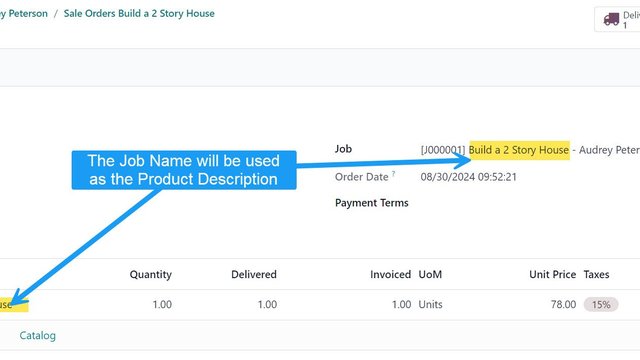
InterAcct Job Costing for Odoo – Change Description of Summary Product on the Quote to the Job Name
When entering a Summary Quote, we now default the Product Name Description to the Job Name. This way we can deliver this item to the customer once complete. Is this not quite what you want? This change might not be exactly what you want, maybe there is so
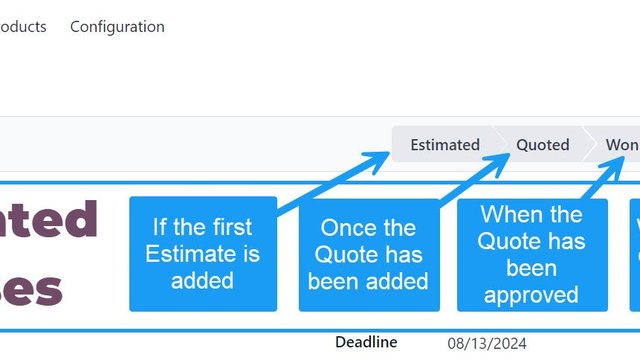
Job Status Changes based on Activity. So the Statuses become more automated.
Job Statuses are very useful for seeing the list of jobs which are active, lost, waiting for approval etc. And keeping these statuses up to date is now easier with some automation built in on conditions. Estimated = When the first estimate has been added
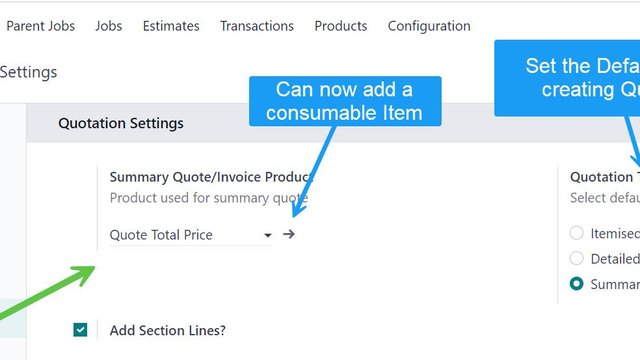
InterAcct Job for Odoo – Set the Default Quotation Options for the Company & Consumable Option as the Summary Product.
Now when you setup the settings for Job Costing, you can now define the default for the Quotation Type. If you don’t enter a default it will use Itemised, the most detailed. You can also define if you want to include the Estimates as Section Headings. Ano